How to Grade Handwritten Exams Faster (AI Benchmark)
Grading handwritten exams takes weeks. Answer Sheet Evaluation by BigChalkBox processes a 500-student batch in under 15 minutes while faculty retain full approval control.
Why Canvas and Moodle can't grade descriptive answers. See the feature gap between a standard LMS and Answer Sheet Evaluation.
An LMS (like Canvas or Moodle) manages digital submissions but cannot evaluate handwritten, descriptive content. Answer Sheet Evaluation by BigChalkBox extracts handwriting, maps answers to semantic rubrics, and scores them automatically, turning your LMS from a simple digital dropbox into an intelligent, automated evaluation pipeline.
Many institutions invest heavily in a Learning Management System (LMS) expecting it to solve all academic bottlenecks. However, an LMS is fundamentally a content delivery and file organization tool, not a semantic evaluator. While it can automatically grade multiple-choice questions (MCQs), it treats descriptive, handwritten assignments as static images or locked PDFs.
In Indian higher education, where university exams remain heavily reliant on long-form handwritten descriptive answers, an LMS only solves half the problem. It collects the papers digitally, but it still forces faculty to read every single line on a screen. This "digital manual grading" often causes more eye strain and fatigue than grading physical paper.
To achieve a truly digital campus, institutions must pair their LMS with a dedicated education assessment software capable of semantic understanding.
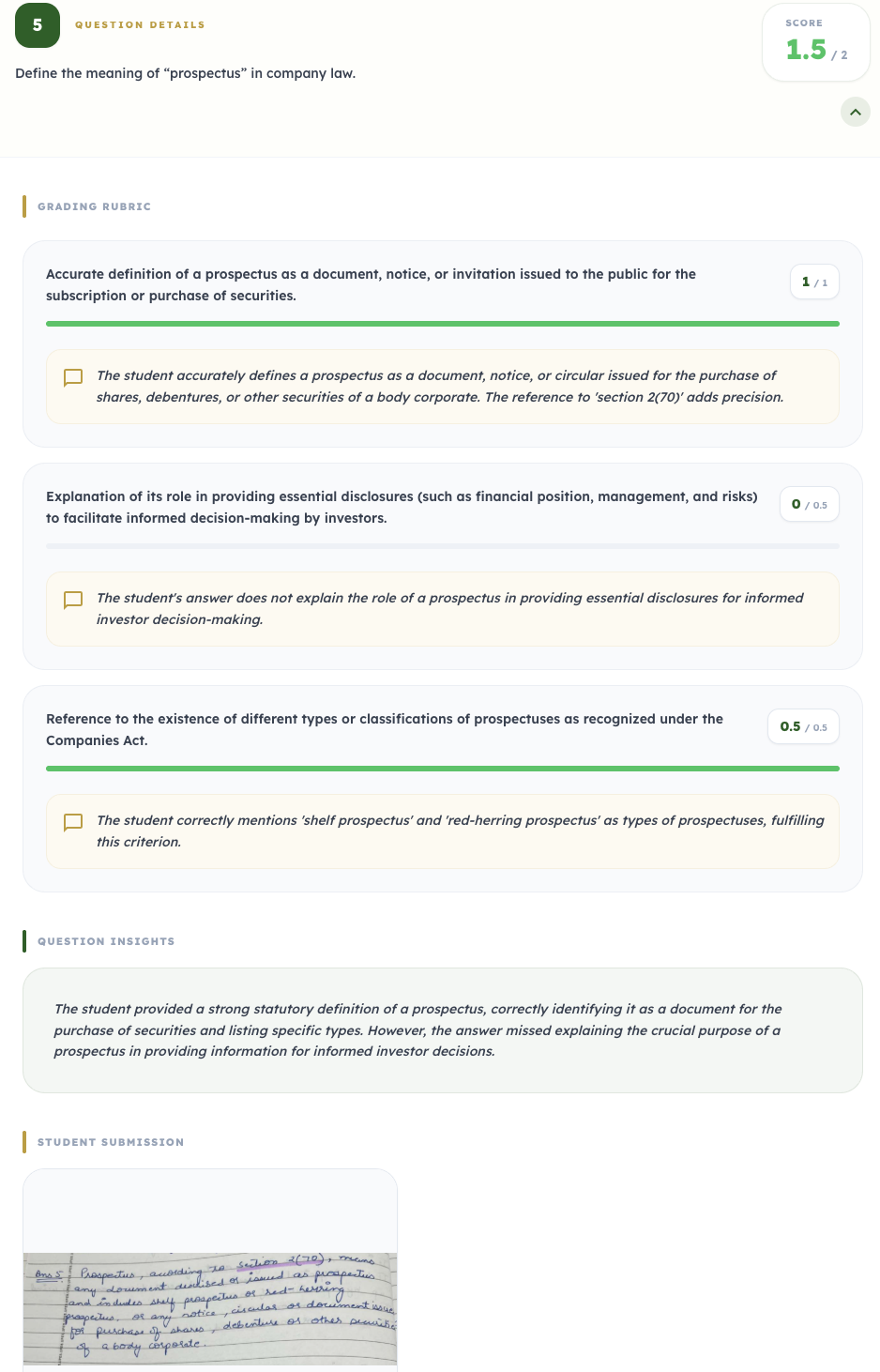
Per-question criterion scoring as seen by faculty in the platform's review panel.
Understanding the limits of an LMS helps administrators decide where to invest in specialized university assessment platforms. The following table highlights the critical missing features in standard LMS deployments.
| Capability | Standard LMS (Moodle/Canvas) | Answer Sheet Evaluation (BigChalkBox) |
|---|---|---|
| Assignment Collection | Excellent (digital dropboxes) | Excellent (bulk scan uploads) |
| Handwriting Extraction | None (treats scans as images) | Yes, tuned for messy Indian handwriting |
| Semantic Rubric Scoring | None (requires manual faculty reading) | Yes, AI maps student text to rubric criteria |
| Detailed PDF Feedback | Requires faculty to type manual comments | Auto-generated per-question breakdown |
By filling these gaps, AI grading software handles the actual cognitive load of evaluation, rather than just the administrative load of file sorting.
Consider an MBA exam where students must analyze a business case study. The answer is three pages long and handwritten. Here is how the two systems manage the evaluation.
| Process Step | LMS-Only Workflow | BigChalkBox Integrated Workflow |
|---|---|---|
| 1. Submission | Student uploads scanned PDF to LMS. | Exams are bulk scanned and uploaded. |
| 2. Reading phase | Faculty opens PDF, zooms in, and reads 3 pages manually. | AI instantly extracts text and isolates key arguments. |
| 3. Rubric application | Faculty remembers the 4-point case study rubric. | System maps extracted arguments strictly against the rubric. |
| 4. Scoring | Faculty manually types "6/10" in the LMS gradebook. | System proposes 6/10 and highlights exactly why marks were deducted. |
| 5. Approval | Faculty moves to the next PDF. | Faculty clicks "Approve", and scores sync directly to the ERP/LMS. |
The integrated workflow reduces evaluation time per script from 10 minutes to roughly 45 seconds of high-level review.
A specialized grading tool does not operate in a vacuum, nor does it override academic authority. Regulatory frameworks mandate that faculty remain responsible for student outcomes. Therefore, AI must be deployed as an augmentation tool, not a replacement.
With BigChalkBox, the AI reads the paper and proposes a score based on the rubric, but the workflow physically halts there. Faculty must log into the dashboard, review the AI's logic, and explicitly approve the score. If a student wrote a brilliant answer that the rubric did not anticipate, the faculty member simply clicks "Override" to adjust the marks.
This oversight ensures that the speed of AI is balanced by the empathy and expertise of a human educator.
When institutions attempt to integrate AI grading alongside their existing LMS, they often stumble on change management. Avoid these implementation errors:
A strategic rollout plan is the difference between a highly successful adoption and a frustrated faculty.
Before investing in an education assessment software to supplement your LMS, evaluate your technical readiness:
| Readiness Check | Yes or no |
|---|---|
| LMS allows for CSV grade imports or API integrations | |
| IT team has a standardized process for bulk-scanning answer booklets | |
| Faculty have digitized their answer keys into structured rubrics | |
| Data privacy policies permit processing student answers on localized servers |
Validating these prerequisites ensures that your new grading platform seamlessly enhances your existing tech stack.
An LMS is a foundational piece of university infrastructure, but it is not built to evaluate complex, descriptive human thought. By integrating a dedicated grading engine, institutions can finally automate the most painful administrative bottleneck in academia.
To see how easily BigChalkBox integrates with your existing workflows, book a discovery call or explore the technical capabilities of Answer Sheet Evaluation today.